Tradytics custom dashboards: options flow, dark pool and more from 56 widgets
By Faizan Ahmad. Updated .
Tradytics custom dashboards put any card in the app on one screen of your own: 56 widgets across charts, live options flow and dark pool prints, Market Net Flow, dealer exposure, open interest, dark pool levels, the scanner, Signals, Probabilities, the AI Fund and the markets.
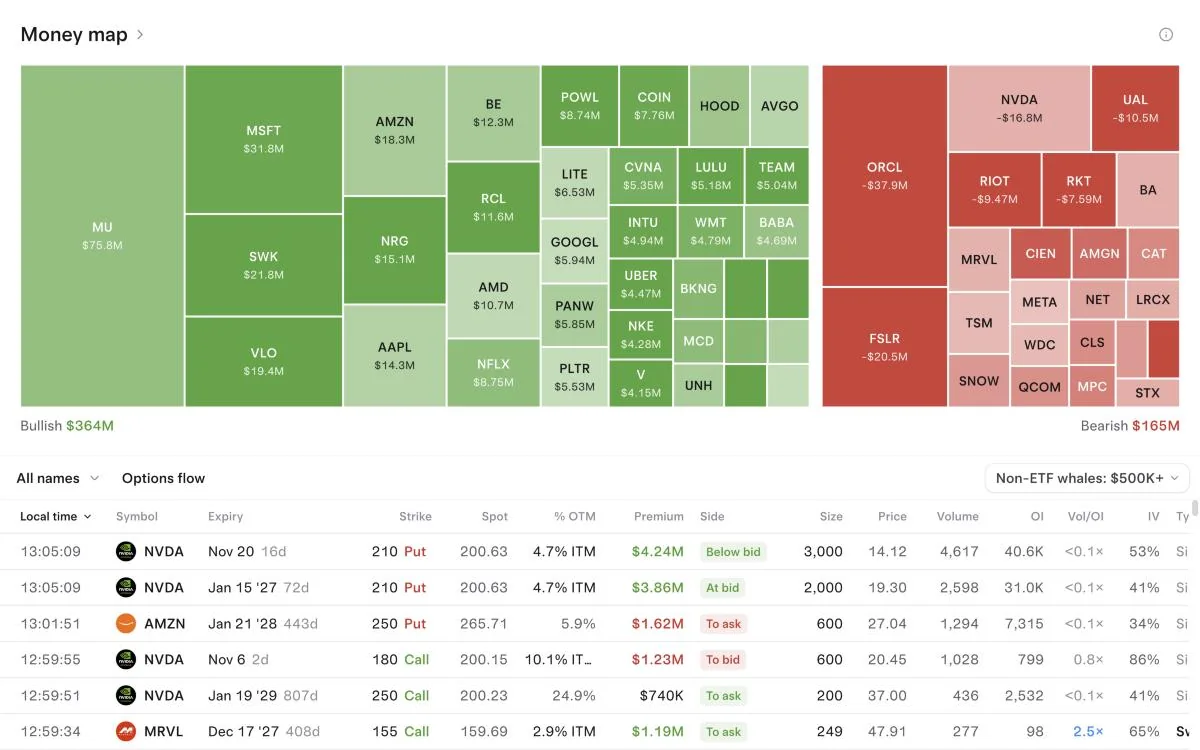
Add any card from the page you see it on, open a featured dashboard from Explore or start blank, drag and resize, give each widget its own ticker or link widgets so one ticker change moves the group, and keep as many dashboards as you want at tradytics.com/dashboards. The whole board refreshes in one request every 5 seconds.
The widgets
| Group | Widgets |
|---|---|
| Charts | Candles with a timeframe switch |
| Markets | 11, from indexes and sectors to movers and the heatmap |
| Options market | 11, including Market Net Flow, 0DTE flow and gamma, and the hottest contracts |
| Flow | Live options flow and live dark pool prints, for all names or one, with a saved view |
| Scanner, Signals | A saved scanner screen; the Signals feed |
| A stock | 8 stock cards, 12 options cards (net flow, dealer exposure, open interest, whales, volatility) and 3 dark pool cards (ranked prints, levels, days) |
| Probabilities | 4, including the S&P 500 outlook |
| AI Fund | 2: the book and the feed |
How a dashboard works
- Explore. Four featured dashboards to open live and add as your own: Big money (the money map, live flow, dark pool prints, a dark pool buying screen, Signals, contracts and sectors), Stock desk (one ticker's chart, statistics, net flow, dealer exposure, whales and dark pool levels, linked), 0DTE desk on SPY (a chart, 0DTE flow and 0DTE gamma, dealer exposure and the S&P 500's chances for the day) and Earnings week (the earnings calendar, the stock's options statistics, the move priced through the report, implied volatility and past reports). Or start blank.
- Add from anywhere. "Add to dashboard" sits in every card's info popover and in the chart's right-click menu, so a card you are looking at goes onto your board with its ticker. Or open the widget gallery: the app's pages on the left, a picture of every widget, one click adds it.
- Edit in place. Drag a widget by its body, resize it from the corner, duplicate or remove it. Widgets in a row share its height.
- Tickers. Each widget has its own ticker, or joins one of four colored link groups: change NVDA to AMD on one and the whole group follows. A desk linked to one ticker shows it once, at the top.
- Many dashboards. Switch, rename, duplicate or delete from the name at the top.
- Phone and tablet. The same board reflows to two columns on a tablet and one on a phone.
Built to stay fast
A dashboard has one clock. Every 5 seconds it asks once for everything on screen that is due, in a single request; widgets scrolled out of view stop asking; live flow and dark pool prints arrive over one shared stream however many widgets show them. On a 50-widget board only the widgets near the screen load, and the server answers each 5-second request in about a millisecond.
Who else lets you build one
Checked on each platform's own site, November 5, 2026.
| Platform | Dashboards elsewhere |
|---|---|
| Tradytics | 56 widgets, every card in the app, including ranked dark pool, Signals, Probabilities and the AI Fund; linked tickers; every plan |
| Unusual Whales | Custom dashboards: 5 on Retail Basic, unlimited on Pro and Max |
| Quant Data | Drag-and-drop layouts with 30+ tools |
| Bullflow | Bullflow Terminal on Premium |
| Koyfin | 2 dashboards free, unlimited paid; no options or flow data |
| Trade Ideas | Windows desktop layouts |
| Benzinga Pro | Up to 4 widgets a workspace |
| TradingView | Chart layouts, not a widget dashboard |
| MenthorQ, OptionStrat, Market Chameleon, TradeAlgo | No dashboard builder listed |
Plans
Dashboards are on every plan. A widget shows what your plan shows: Free sees a stock's options and dark pool cards under a fade, Plus and Pro see them live.
Common questions
Can I build a custom options flow dashboard?
Yes. Tradytics dashboards combine live options flow, dark pool prints, Market Net Flow, dealer exposure and 50 more widgets on one screen, each with its own ticker or linked to others.
Can I add a card to a dashboard from the page I'm on?
Yes. Every card with its own page has "Add to dashboard" in its info popover, and the chart has it in its right-click menu. The card lands on your dashboard with its ticker.
How many widgets are there?
56, covering every card in the app: charts, markets, the options market, flow, the scanner, Signals, a stock's research, options and dark pool cards, Probabilities and the AI Fund.
Can widgets follow the same ticker?
Yes. Put widgets in one of four link groups and changing the ticker on one changes it on all of them.
Are dashboards free?
Yes, on every plan. Plus and Pro unlock the live flow, dark pool and a stock's options cards inside them.