How to use Tradytics data in ChatGPT, Claude and your own code
By Faizan Ahmad. Updated .
Tradytics Pro ($69 a month or $499 a year) gives you two ways to use its data outside the app. The MCP server at https://tradytics.com/mcp lets Claude, ChatGPT and Cursor call Tradytics data as tools: add it as a custom connector and sign in with your Tradytics account. The JSON API at https://tradytics.com/api/public/v1 serves the same kinds of data to your own code, with 50,000 calls a day: options flow, dark pool prints, prices, the market, research, the scanner and AI trade signals.
What is the Tradytics MCP server?
MCP, the Model Context Protocol, is an open standard for connecting AI applications to outside data and tools. Once an assistant is connected to Tradytics' MCP server, you ask in plain words and the assistant decides which Tradytics tools to call, pulls the data and answers with it. No code is needed.
Sign-in uses OAuth: the assistant sends you to Tradytics to sign in and approve access, so it never sees your password. Access covers six areas: market, options, dark pool, research, scanner and signals. The setup guide is at tradytics.com/docs/mcp.
How do you connect Tradytics to Claude, ChatGPT or Cursor?
| App | Where to add it | What to enter |
|---|---|---|
| Claude | Customize, then Connectors, then Add custom connector | Name: Tradytics. URL: https://tradytics.com/mcp. Then sign in. |
| ChatGPT (web) | Plugins, then the plus button, then Add custom MCP server | Name: Tradytics. Server URL: https://tradytics.com/mcp. Set up sign-in, then create and install it. |
| Cursor | ~/.cursor/mcp.json (all projects) or .cursor/mcp.json (one project) | {"mcpServers": {"tradytics": {"url": "https://tradytics.com/mcp"}}}, then sign in when Cursor asks. |
Claude
- In Claude, go to Customize, then Connectors.
- Click Add, then Add custom connector.
- Name it Tradytics and enter
https://tradytics.com/mcpas the remote MCP server URL. - Choose to sign in, then sign in to Tradytics and approve access.
Claude says custom connectors work on its Free, Pro, Max, Ultra, Team and Enterprise plans, with Free limited to one. On Team and Enterprise, an owner adds the connector in Organization settings and members click Connect.
ChatGPT
- Use ChatGPT on the web and open Plugins.
- Click the plus button, then Add custom MCP server.
- Enter a name and
https://tradytics.com/mcpas the Server URL, and set up authentication. - Review the risk warning, choose "I understand and want to continue", then Create as a plugin.
- Install the plugin, then use it in a chat.
OpenAI notes that workspace permissions and security settings apply to custom MCP servers, so on a work account an admin may need to allow it.
Cursor
Add the server to mcp.json as shown in the table, either globally in your home folder or in one project's .cursor folder. Cursor supports OAuth for remote servers and opens the Tradytics sign-in when it first connects. From then on, Cursor's agent can pull Tradytics data while you write trading code.
What can you ask once Tradytics is connected?
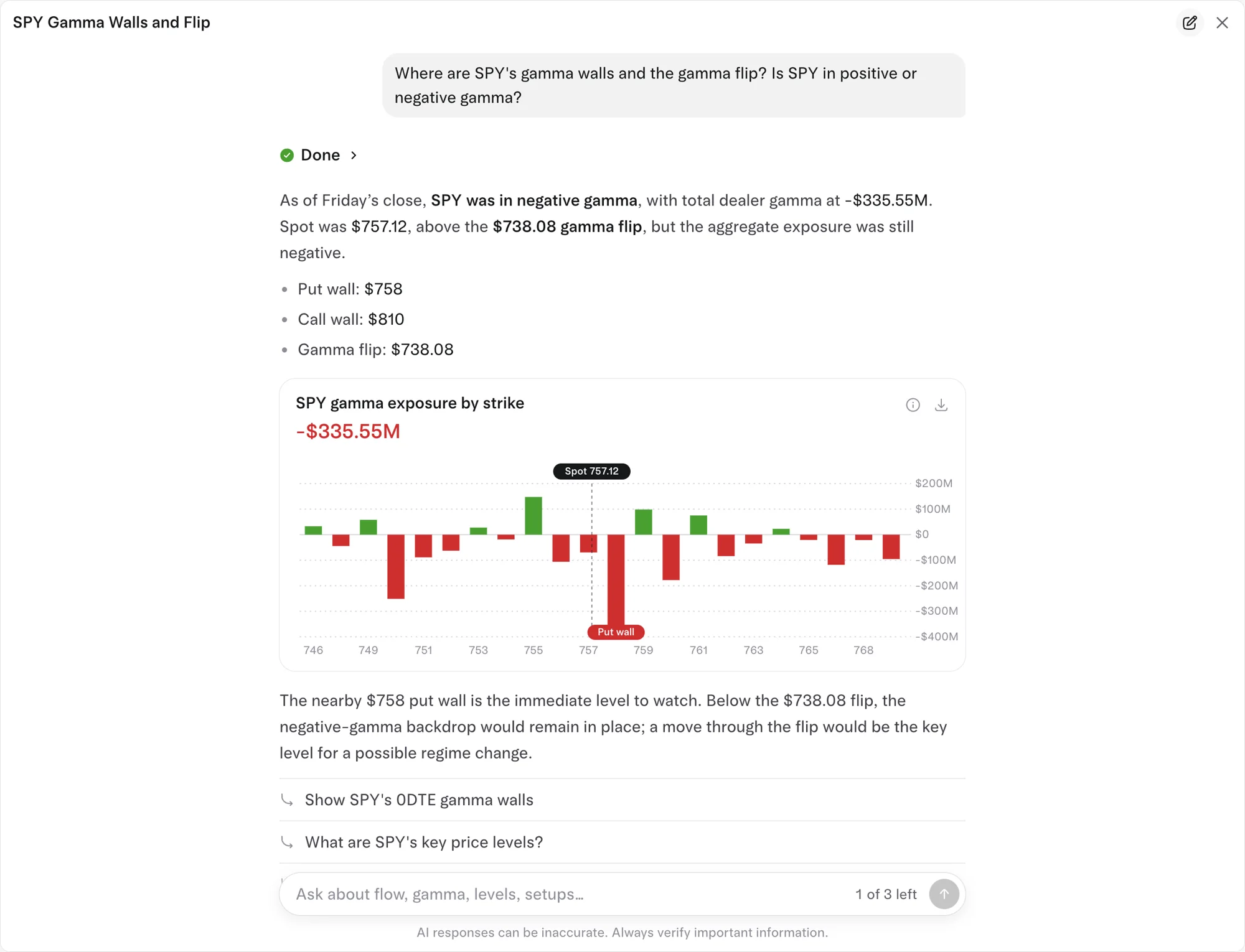
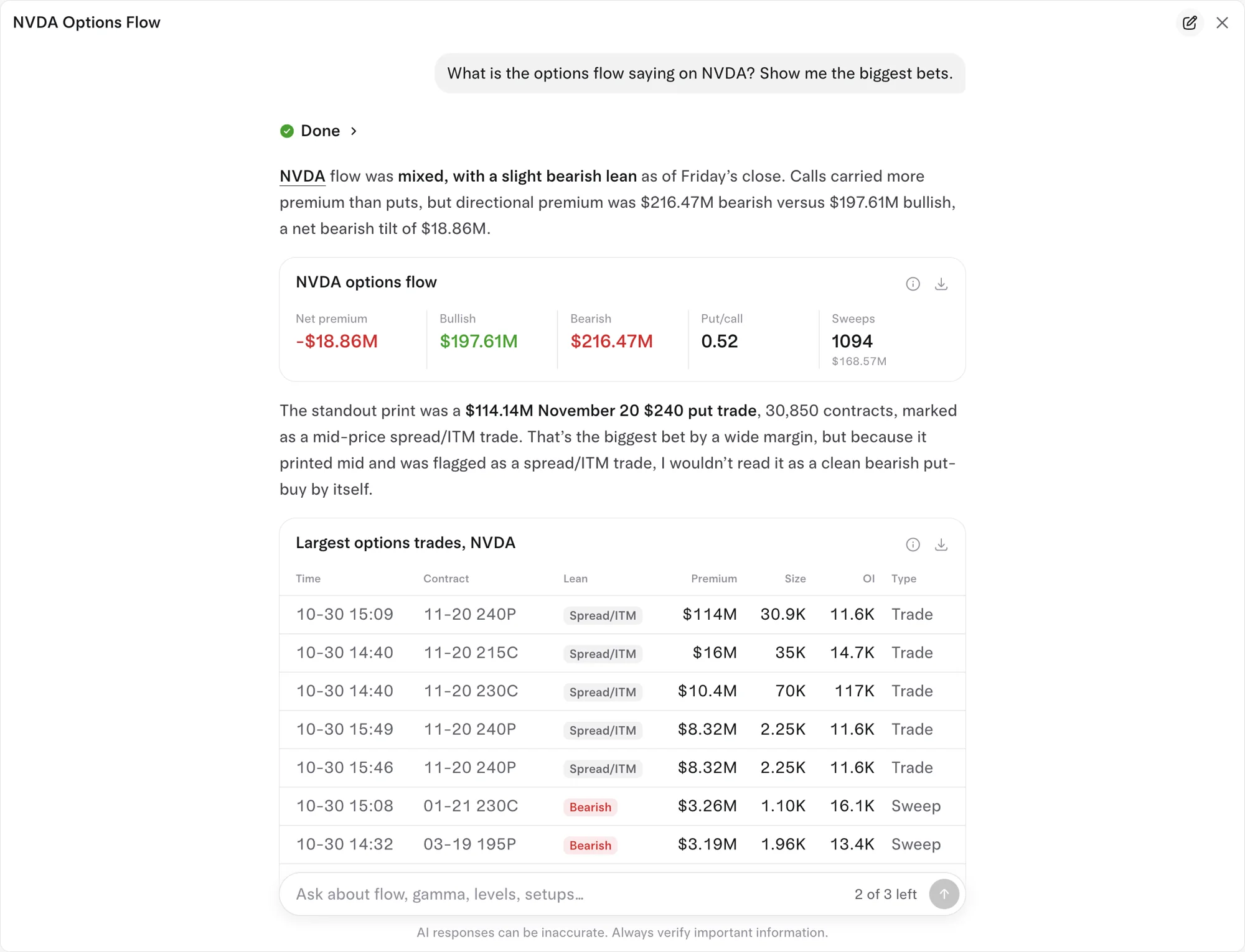
Ask the way you would ask a trader friend. The assistant pulls the same data Tradytics shows in the app. A few questions, with what the app showed for October 30, 2026:
- "What were the biggest options trades today?" On October 30, 2026, SPX December 18 options led, topped by a $438.98M 12000 put at 3:26 PM. The biggest single-stock print was a block of 52,800 NVDA January 15, 2027 $180 calls, $172.81M in premium, at 11:55 AM.
- "Where are SPY's gamma walls?" On October 30, 2026: call wall $810, put wall $758, gamma flip $738.08, total dealer gamma -$335.55M.
- "Show me MSFT's dark pool levels." On October 30, 2026, the biggest over the last 10 sessions were $521.71 ($2.90B in 47 prints) and $530.28 ($2.40B in 22 prints).
- "Which stocks had the most bearish options flow today?" On October 30, 2026, MSTR led at -$44.61M net, then TSLA at -$32.94M and AMD at -$28.20M.
Options flow is live to the second on Pro. Dark pool prints are after-the-fact reports by nature, and Tradytics shows them within about 15 minutes of their report; see whether dark pool data is real time.
How do you use the Tradytics API in your own code?
- Be on Pro, then create an API key from the docs at tradytics.com/docs.
- Send the key on every request as
Authorization: Bearer YOUR_KEY. A request without it gets a 401 with the codemissing_key. - Call any endpoint under
https://tradytics.com/api/public/v1. Responses are JSON.
A first call from a terminal:
curl -H "Authorization: Bearer YOUR_KEY" https://tradytics.com/api/public/v1/options/flow
The base URL on its own (https://tradytics.com/api/public/v1/) returns the full list of endpoints: 59, in six scopes.
| Scope | What it covers | Example endpoints |
|---|---|---|
| Market | Symbols, quotes, chart bars, market overview, news, calendars, insider and Congress trades | /quotes, /symbols/{symbol}/bars, /market/movers, /calendar/earnings |
| Options | Options flow, the options market and each symbol's options | /options/flow, /market/options/unusual, /market/options/zero-dte, /symbols/{symbol}/options/gamma |
| Dark pool | Dark pool prints and levels | /darkpool/prints, /symbols/{symbol}/darkpool |
| Research | Each symbol's fundamentals, analysts, earnings and technicals | /symbols/{symbol}/summary, /symbols/{symbol}/earnings, /symbols/{symbol}/financials |
| Scanner | The full-market scanner | /scanner, /scanner/fields, /symbols/{symbol}/scan |
| Signals | AI trade signals and their timelines | /signals, /signals/{id} |
Keep your key out of shared code and public repositories, and treat it like a password.
Not on Pro? Use the AI analyst inside Tradytics
If you want an AI that reads Tradytics data but don't need it in your own tools, the AI analyst is built into every page on every plan. It decides what data it needs, pulls it, shows its steps and answers with cards it builds.
Which plan includes the API and MCP server?
| Free | Live | Pro | |
|---|---|---|---|
| Price | $0 | $39 a month or $299 a year | $69 a month or $499 a year |
| API and MCP server | No | No | Yes, 50,000 calls a day |
| AI analyst in the app | 3 questions a day | 20 questions a day | Unlimited |
| Options flow | Yesterday's session | Live, to the second | Live, to the second |
See Tradytics pricing for everything else in each plan, and the best AI tools for options traders for how this compares with other options.
Common questions
Does Tradytics have an API?
Yes. Pro includes a JSON API at https://tradytics.com/api/public/v1 for options flow, dark pool prints, prices, the market, research, the scanner and AI trade signals, with 50,000 calls a day.
Can I use Tradytics in ChatGPT or Claude?
Yes, on Pro. Add https://tradytics.com/mcp as a custom connector in Claude or a custom MCP server in ChatGPT, then sign in with your Tradytics account.
Do I need to know how to code to use the MCP server?
No. In Claude and ChatGPT you paste one URL and sign in. Only the API needs code.
What is the difference between the MCP server and the in-app AI analyst?
The AI analyst is built into Tradytics on every plan. The MCP server brings Tradytics data into the assistant you already use, like Claude, ChatGPT or Cursor, and is part of Pro.
How many API calls do I get?
50,000 a day on Pro.
Sources
- Model Context Protocol: What is MCP?, defining MCP as an open-source standard for connecting AI applications to external systems.
- Claude Help Center: Getting started with custom connectors using remote MCP, for the steps to add a connector and which Claude plans support it.
- OpenAI: Add custom MCP server, for adding a custom MCP server in ChatGPT on the web.
- Cursor Docs: Model Context Protocol, for the
mcp.jsonformat, file locations and OAuth support for remote servers.